
B2B marketing attribution is how you work out which channels created and moved a deal. It follows the journey from first visit to signed contract. No single report gives the full answer, because B2B buyers research across many channels and people.
The reliable method combines CRM tracking, what buyers tell you and simple tests of what changes revenue. This guide shows how to set that up for a UK B2B tech firm, step by step. It covers attribution models, GA4 limits, UTMs, self-reported source, UK consent rules and lessons from real client accounts.
What is B2B marketing attribution?
B2B marketing attribution assigns credit for pipeline and revenue to the marketing touches that came before a deal. A touch can be an ad click, a search visit, an email, an event or a sales call. The goal is to spend more on channels that create good deals and less on those that do not.
Attribution is not the same as lead source. Lead source records one moment, usually the first or last visit. Attribution looks at the whole journey and every person from the buying company.
Why B2B marketing attribution is harder than B2C
- Several people buy together. One person may find you on Google while a colleague books the demo after a LinkedIn post.
- Buyers research alone. Gartner reports that 75% of B2B buyers prefer a sales experience without a rep.
- AI tools hide the start of the journey. In a G2 survey, 51% of B2B buyers start software research in AI chatbots more often than in Google.
- Sales cycles outlast tracking windows. GA4’s longest key event lookback window is 90 days.
- Some visits are never tracked. UK visitors can refuse cookies, and word of mouth leaves no click at all.
This hidden research is often called the dark funnel. It is why tracking software alone cannot tell you which channel won the deal.
Marketing attribution models compared
An attribution model is the rule that decides how credit is shared between touches. Each model answers a slightly different question, so the right one depends on the decision you need to make.
| Model | How credit is shared | Best for | Watch out for |
| First touch | All credit to the first recorded touch | Seeing which channels create new demand | Ignores everything that moved the deal later |
| Last touch | All credit to the last touch before the conversion | Seeing what closes the lead | Overrates brand search and direct visits |
| Linear | Equal credit to every touch | Seeing every channel involved | Treats a newsletter open like a demo |
| Time decay | More credit to touches near the conversion | Short sales cycles | Undervalues early discovery |
| U-shaped | Most credit to first touch and lead creation, the rest shared | Valuing both discovery and conversion | Middle touches get little credit |
| W-shaped | Most credit to first touch, lead creation and opportunity creation | B2B teams with clear CRM stages | Needs clean, consistent stage data |
| Data-driven | An algorithm shares credit based on your own conversion data | Accounts with plenty of conversions | Hard to explain and needs volume |
What GA4 and Google Ads offer in 2026
Google Analytics now offers three attribution models: data-driven, paid and organic last click, and Google paid channels last click. Google says first click, linear, time decay and position-based models are no longer available as of November 2023.
Google Ads offers last click and data-driven, and data-driven is the default for most conversion actions. So if you want first-touch, U-shaped or W-shaped reports, build them in your CRM or an attribution tool.
| GA4 setting | Options | What it means for B2B |
| Key event lookback window | 90 days by default, or 30 or 60 days | Touches older than the window get no credit |
| Acquisition key event lookback | 30 days by default, or 7 days | Affects first visit and first open credit |
| Data retention (standard properties) | 2 months or 14 months | Set 14 months, as it limits explorations and funnel reports |
Those settings come from Google’s attribution settings and data retention help pages. If your deals take longer than 90 days, your CRM must hold the full history.
Which model should a B2B tech firm use?
For most UK B2B tech firms with fewer than a few hundred deals a year, simple beats clever. We recommend three views side by side rather than one perfect model.
- First touch from your CRM: shows which channels bring new accounts into the funnel.
- Lead-creation touch from your CRM: shows which channels turn interest into a form fill or booked call.
- Self-reported source: shows what the buyer remembers, including channels your tracking cannot see.
Add W-shaped multi-touch attribution once your CRM stages are reliable. Keep data-driven attribution inside Google Ads, where it helps bidding.
The three-view method: how to know which channel won the deal
No single data source tells the full story, so compare three. When at least two of them point to the same channel, you can act with confidence.
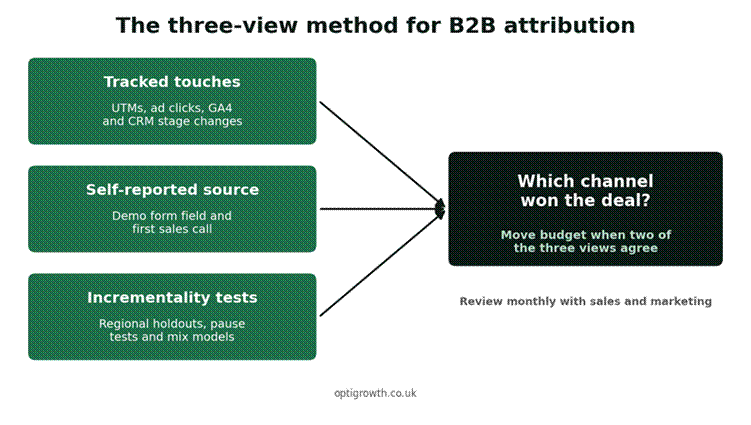
Figure 1: Compare three views before you move budget
| View | What it captures | What it misses |
| Tracked touches | Clicks with UTMs, ad clicks, form fills and CRM stage changes | AI chats, word of mouth, podcasts and visits without consent |
| Self-reported source | What the buyer says brought them to you | Small touches people forget, and some memory bias |
| Incrementality tests | What changes when you start, stop or change a channel | Needs time, steady volume and patience |
Step 1: Define your funnel stages and CRM fields
B2B marketing attribution fails when sales and marketing use different words for the same thing. Agree on the stages first: lead, marketing-qualified lead, sales-qualified lead, opportunity and closed won.
CRM fields every B2B deal needs
Add fields to your CRM so every deal carries its history. Group contacts by company, because several people from one account may engage before a deal.
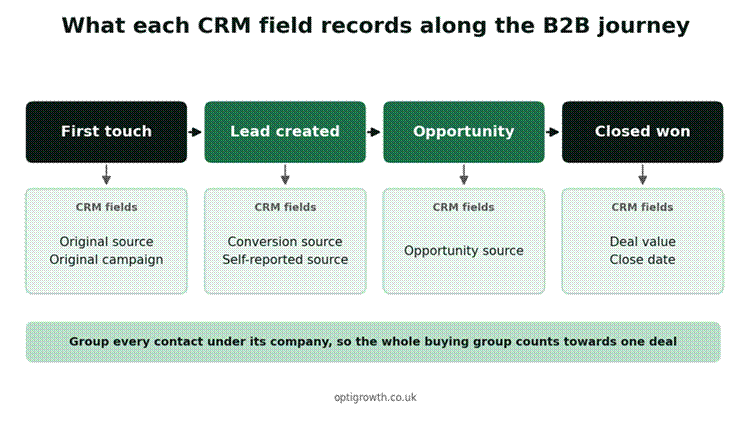
Figure 2: Each CRM field captures one moment in the deal
| CRM field | Example values | How it is filled |
| Original source | organic search, paid search, paid social, email, referral | Automatically from the first tracked visit |
| Original campaign | The utm_campaign value of the first visit | Automatically from the URL |
| Conversion source | The channel of the visit that created the lead | Automatically from the form fill |
| Self-reported source | Free text, such as ‘saw you on a podcast’ | The buyer, on the demo form |
| Opportunity source | The channel or touch before the opportunity | Sales, at the first meeting |
| Deal value and close date | Contract value and the date it closed | Sales, when the deal closes |
Our CRM and call tracking service sets up these fields, connects your forms and calls, and builds the dashboards.
Step 2: Tag every link with a UTM naming convention
UTM parameters tell analytics where a visit came from. Google says you should always use utm_source, utm_medium and utm_campaign, and it also recommends utm_id and utm_source_platform. Values are case sensitive, so ‘linkedin’ and ‘LinkedIn’ show up as two different sources.
| Channel | utm_source | utm_medium | utm_campaign pattern |
| LinkedIn ads | paid_social | 2026-q4_demo_[segment] | |
| LinkedIn organic posts | social | 2026-q4_[topic] | |
| Email newsletter | newsletter | 2026-10_[issue-name] | |
| Outbound email sequence | outbound | 2026-q4_[sequence-name] | |
| Partner or referral link | [partner-name] | referral | 2026_[partner-programme] |
| Google Ads | Use auto-tagging | Use auto-tagging | Set in Google Ads |
These mediums match GA4’s default channel group rules. For example, a social source with a medium starting ‘paid’ lands in Paid Social. A medium of ’email’ lands in Email.
- Write every value in lowercase and use underscores or hyphens, never spaces.
- Keep one shared sheet of approved values, and only one person adds new ones.
- Never add UTMs to internal links on your own site, as they overwrite the real source.
- Put the same campaign name in your CRM so ad spend and deals can be joined later.
Tracking visits from ChatGPT and AI search
OpenAI says ChatGPT automatically adds utm_source=chatgpt.com to referral links. So those visits show up in GA4 as a separate source. Google’s AI Overviews and AI Mode are different: Google counts them within the overall Web figures in Search Console.
Many AI-assisted journeys still leave no click at all. That is where the next step matters most.
Step 3: Capture self-reported attribution
Self-reported attribution means asking buyers how they heard about you. It catches the channels software misses, such as AI chats, podcasts, communities and colleagues’ advice.
Ask in two places: a required free-text field on the demo form, and on the first sales call. Free text gives you real words, which are more useful than a long dropdown list.
| Self-reported attribution: form field and sales call question Form field (required, free text): How did you first hear about us? First sales call: Where did you first come across us, and what made you get in touch now? |
Each month, group the answers into the same channel names you use in your UTMs. Then compare them with the original source in your CRM.
| Example answer | Channel group | What to do with it |
| ‘A colleague recommended you’ | Word of mouth | Track referral volume and ask for introductions |
| ‘Asked ChatGPT for options’ | AI search | Check how AI tools describe your brand and category |
| ‘Your posts on LinkedIn’ | Organic social | Credit the content, even if the tracked source is direct |
| ‘Googled [category] software’ | Organic or paid search | Compare with the tracked first touch |
Step 4: Connect ad platforms and calls to your CRM
Attribution only matters if it changes where you spend. So send CRM outcomes back to the ad platforms, and log calls with their source.
Google’s enhanced conversions for leads is an upgraded form of offline conversion import. It uses data visitors provide, such as an email address, to match CRM outcomes to ad clicks. Our Google Ads for SaaS playbook explains the set-up.
- Calls: use call tracking numbers linked to each channel, and log the source on the CRM record.
- Events: upload attendee lists to the CRM with the event as a campaign.
- Outbound: record which sequence or rep first contacted the account.
- Other ad platforms: check each platform’s offline conversion options and send the same CRM stages.
Lesson from Integ: count real outcomes, not clicks
Integ Consulting is a US enterprise software firm that sells compliance and AI tools to utilities. Its first tracking set-up counted button clicks and page views as conversions. The results summary showed 46 form events counted as conversions, against 2 verified demos in the first 30 days.
We recommended tracking confirmed demo bookings instead, through a booking tool and Google Tag Manager. The aim was accurate lead attribution and cleaner data for decisions about spend.
Step 5: Follow UK consent rules and plan for gaps
Under PECR, cookies and similar technologies need consent unless an exception applies. The ICO describes an exception for statistical purposes that covers aggregate analytics used to improve your site. Users must get clear information and a simple, free way to object.
The ICO is also clear about the limits. The exception does not allow you to track individual visitors, and no exception covers online advertising.
Google’s EU user consent policy applies to UK users too. It requires consent for cookies where the law requires it, and for personal data used to personalise ads. Consent mode passes each visitor’s choice to Google tags.
How to plan for consent gaps
- Expect a share of visits with no source, and report that share openly.
- Do not try to track people who refused, as that breaks the rules and damages trust.
- Lean on CRM fields and self-reported source to fill the gaps.
- Review your banner and consent set-up whenever you add a new tag.
Step 6: Test what actually changes revenue
Attribution shows which touches came before a deal. It does not prove that a channel caused the deal. Incrementality testing checks what changes when you start, stop or change a channel.
| Test | How it works | Best for |
| Regional holdout | Run a campaign in some UK regions and not others, then compare demo rates | LinkedIn and paid social |
| Pause test | Pause a channel for a set period and watch pipeline | Channels you suspect take credit they did not earn |
| Budget step test | Raise or lower spend in steps and track demos and pipeline | Paid search budgets |
| Marketing mix modelling | Statistical model of spend and results over a long period | Larger, steady budgets across many channels |
Marketing mix modelling for larger budgets
Marketing mix modelling has usually needed specialist skills and paid software. Google’s Meridian is an open-source marketing mix model, so the software itself is free to use. It still needs a long and consistent history of spend and results.
How to read the results and decide which channel won
Hold a short attribution review each month with sales and marketing together. Look at closed deals and new opportunities, not just leads.
- If tracked first touch and self-reported source agree, credit that channel with creating the deal.
- If they disagree, trust the buyer’s answer for discovery and tracked data for the final step.
- If a channel shows up in many won deals but rarely first or last, test it before cutting it.
- If a channel brings leads but few opportunities, fix targeting or offer before adding budget.
| Metric by channel | What it tells you |
| Pipeline created | How much opportunity value each channel sourced |
| Win rate | Whether the channel brings buyers who actually sign |
| Revenue closed | The money the channel helped bring in |
| Cost per opportunity | What you pay for a real sales conversation |
| Sales cycle length | How fast deals from the channel close |
For channel-specific playbooks, read our guides to SaaS SEO and LinkedIn lead generation.
B2B marketing attribution tools: what you actually need
You do not need an expensive platform to start. Most B2B tech firms can begin with tools they already pay for. Add a dedicated attribution tool later, as deal volume grows.
| Layer | What it does | Examples |
| Web analytics | Records visits, sources and key events | Google Analytics 4 |
| Tag management | Controls tracking tags and consent signals | Google Tag Manager |
| Consent management | Shows the cookie banner and stores each choice | A consent platform that supports consent mode |
| CRM | Holds contacts, accounts, deals and source fields | HubSpot, Pipedrive, Salesforce or Zoho |
| Call tracking | Links phone calls to the channel that drove them | A call tracking tool connected to your CRM |
| Reporting | Joins spend, pipeline and revenue in one view | Looker Studio or your CRM’s dashboards |
| Attribution platform (optional) | Builds multi-touch models across channels | Worth a look once deal volume is steady |
Check which attribution reports your CRM plan already includes before you buy anything new. A clean CRM with good source fields beats an expensive tool fed with messy data.
Case study: building one measured pipeline for Innovent
Innovent sells custom software, cloud and digital transformation services in the UAE, Europe and North America. Before the engagement, its growth came almost entirely from referrals. Over six months, we ran Google Ads, SEO, LinkedIn outreach, AI automation and email as one instrumented pipeline.
| Metric (six months) | Result |
| Qualified B2B leads | 310+ |
| Sales meetings booked | 87 |
| Cost per lead on paid search | 42% lower |
| CRM data flow | 100% automated |
Because every channel fed one instrumented pipeline, the case study reports clearer pipeline visibility and more reliable forecasting. Innovent sells mainly outside the UK, so treat the figures as proof of the method, not a UK benchmark. See more results on our work page.
Your 30-day B2B marketing attribution checklist
- Agree funnel stage definitions with sales and write them down.
- Add original source, conversion source, self-reported source and opportunity source fields to the CRM.
- Set GA4 data retention to 14 months and check the key event lookback window.
- Publish a UTM naming sheet and tag every live campaign link.
- Add a required ‘How did you hear about us?’ field to every demo form.
- Connect Google Ads to CRM stages with enhanced conversions for leads.
- Check your consent banner and consent mode set-up.
- Run the first monthly attribution review with sales and marketing together.
Common B2B marketing attribution mistakes
- Judging channels on leads instead of opportunities and revenue.
- Trusting last-click reports, which overrate brand search and direct visits.
- Letting each team invent its own UTM values.
- Adding UTMs to internal links, which wipes out the real source.
- Ignoring what buyers say because it is not in the dashboard.
- Cutting a channel based on one model without testing first.
- Treating untracked visits as a tracking bug rather than a UK consent reality.
Frequently asked questions about B2B marketing attribution
What is B2B marketing attribution?
B2B marketing attribution assigns credit for pipeline and revenue to the marketing touches before a deal. It looks at every channel and every person from the buying company. The aim is to spend more on channels that create good deals and less on those that do not.
What is the best attribution model for B2B?
No single model is best for every B2B firm. Most UK B2B tech firms should compare first touch and lead-creation touch from the CRM with self-reported source. Add W-shaped multi-touch attribution once CRM stages are reliable, and keep data-driven attribution for Google Ads bidding.
Does GA4 still offer first-click and linear attribution?
No, Google says first click, linear, time decay and position-based models are no longer available as of November 2023. GA4 now offers data-driven, paid and organic last click, and Google paid channels last click. Build other models in your CRM or an attribution tool.
What is multi-touch attribution in B2B?
Multi-touch attribution shares credit for a deal across several touches instead of giving it all to one. Linear, U-shaped and W-shaped models are common examples. In B2B, it works best when CRM stages such as lead, opportunity and closed won are recorded consistently.
What is self-reported attribution?
Self-reported attribution means asking buyers how they heard about you, on the demo form and first sales call. It captures channels tracking misses, such as AI chats, podcasts and word of mouth. Compare the answers with your tracked data each month.
How do UK cookie rules affect marketing attribution?
Under PECR, cookies and similar technologies need consent unless an exception applies. The ICO’s statistical purposes exception covers only aggregate analytics, and no exception covers advertising. So some visits will never be tracked, and CRM fields plus self-reported source fill the gap.
How do I track leads that come from ChatGPT?
OpenAI says ChatGPT adds utm_source=chatgpt.com to referral links, so those visits show up in GA4. Many AI-assisted journeys leave no trackable click, such as reading an answer and searching your name later. Add a ‘How did you hear about us?’ field so buyers can tell you directly.
Get a free marketing attribution review
OptiGrowth is an AI digital marketing agency based in Manchester. We set up B2B marketing attribution for UK tech companies. We connect your channels, CRM and reporting so you can see what wins deals.
Our free marketing audit includes a 30-minute strategy call and a 90-day growth roadmap, with no obligation. For the wider strategy, read our SaaS marketing guide or see our B2B marketing agency page.
If you would rather talk first, contact our team directly.