Google Ads for SaaS works when you bid on searches from buyers ready to compare tools. Then you optimise for demos and pipeline, not clicks or cheap form fills. For UK B2B tech firms, that means tight campaigns, strict negatives, focused landing pages and CRM data fed back.
This playbook covers each step, from tracking and campaign structure to bidding, UK consent rules and costs. It also shares real results from two B2B software accounts we managed.
Is Google Ads worth it for SaaS and B2B tech companies?
Google Ads for SaaS is worth it when buyers already search for your category or the problem you solve. Paid search reaches them at the moment of need, often within days of launch. SEO takes longer but keeps working after spend stops, so the two work best together.
Search is still the largest digital ad channel in the UK. IAB UK reports that search took 44% of UK digital ad spend in 2025, growing 6% to £17.9bn.
| Google Ads works well when | Google Ads struggles when |
| Buyers already search for your category or problem | Your category is so new that nobody searches for it yet |
| You have a clear offer, such as a demo, trial or pricing page | The only next step is a vague ‘contact us’ form |
| Your deal value can cover the cost of several leads | Your price is too low to pay for clicks and sales time |
| Leads flow into a CRM and get a clear status | Nobody tracks what happens after the form fill |
If you are weighing paid search against organic, read our Google Ads vs SEO guide. Our SaaS SEO guide covers the organic side for software firms.
Why Google Ads for SaaS is different in B2B
Most Google Ads advice is written for shops and local services. B2B software has longer sales cycles, fewer conversions and a much wider gap between a lead and a customer.
| Factor | Shops and local services | B2B SaaS |
| Main conversion | A purchase or a phone call | A demo, trial or sales-qualified lead |
| Sales cycle | Minutes to days | Often weeks or months |
| Who searches | Mostly buyers | Buyers, plus students, job seekers and competitors |
| Value of a conversion | Known at checkout | Known only when the deal closes in the CRM |
| Data for bidding | Plenty of conversions | Few conversions, so each signal matters more |
Step 1: Set up B2B conversion tracking before you spend
Tracking is the foundation of Google Ads for SaaS, because Smart Bidding learns from the conversions you give it. If you count button clicks or page views, Google will find you more people who click buttons. So decide which actions show real buying intent before you launch.
Google separates conversion actions into primary and secondary. Primary actions are used for bidding, while secondary actions are for observation only. Use that split to keep bidding focused on qualified leads.
| Conversion action | Set as | Why |
| Demo booked (confirmed in the calendar) | Primary | The clearest sign of buying intent on your site |
| Free trial started (self-serve products) | Primary | A real product action, not just a click |
| Sales-qualified lead (imported from CRM) | Primary, once data flows | Teaches bidding which leads sales accepts |
| Opportunity or closed deal (imported from CRM) | Primary, with a value | Lets you bid for pipeline value |
| Contact form, pricing page view, button clicks | Secondary | Useful to watch, but too weak to bid on |
Enhanced conversions for leads: send CRM data back to Google
Google describes enhanced conversions for leads as an upgraded version of offline conversion import. It uses data your visitors provide, such as an email address, to match CRM outcomes to ad clicks. The data is hashed before it is compared with signed-in Google accounts.
- Turn on auto-tagging in Google Ads, as Google’s set-up guide requires.
- Capture an email or phone number on your demo form, and accept Google’s customer data policies.
- Store the lead in your CRM with its Google click ID where possible.
- Import stage changes such as SQL, opportunity and closed won through Data Manager or the API.
- Make the CRM stages primary once enough data flows, so bidding optimises for them.
Google lets you set a click-through conversion window of up to 90 days for Search, depending on the source. The default is 30 days. If your sales cycle is longer, import an earlier stage, such as SQL, so the signal arrives in time.
Lesson from Integ: soft conversions hide the real picture
Integ Consulting is a US enterprise software firm that sells compliance and AI tools to utilities. Its results summary showed 46 form events counted as conversions, against 2 verified demos in the first 30 days. The original tracking counted button clicks and page views as conversions.
We recommended tracking confirmed demo bookings instead, through a booking tool and Google Tag Manager. The aim was accurate lead attribution and cleaner data for optimising the campaigns.
UK consent rules for Google Ads tracking
The ICO is clear that no consent exception covers online advertising. If you use cookies or similar technologies for advertising, you must get consent. That includes the Google Ads tag and remarketing.
Google’s EU user consent policy also applies to users in the UK. It requires consent for cookies where the law requires it, and for personal data used to personalise ads. Consent mode is how your site passes each visitor’s choice to Google.
- Use a consent banner that gives a real choice, with reject as easy as accept.
- Set up consent mode so Google tags respect each visitor’s choice.
- Only send hashed emails for enhanced conversions where your privacy notice covers it.
- Expect fewer observed conversions, and judge results with CRM data as well.
Step 2: Build a SaaS Google Ads campaign structure by intent
A good structure keeps each type of search in its own campaign. That way, budgets and bids match the value of each search, and reports stay readable.
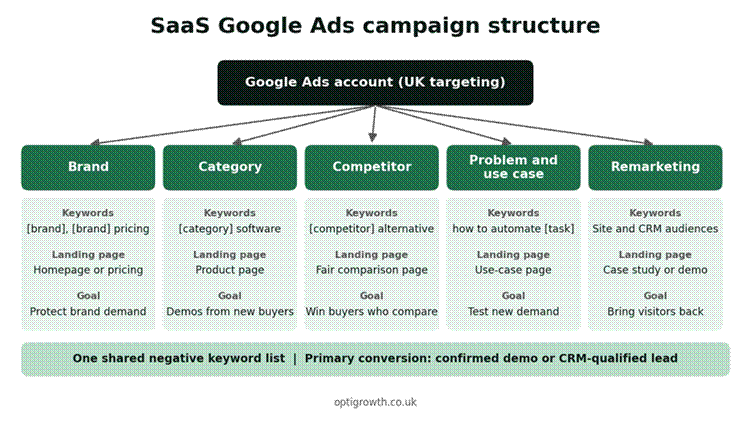
Figure 1: Split SaaS Google Ads campaigns by buyer intent
| Campaign | What it targets | Example keyword themes | Landing page |
| Brand | People searching for you by name | [your brand], [your brand] pricing, [your brand] login | Homepage or pricing page |
| Category | Buyers looking for a tool like yours | [category] software, [category] platform UK, [category] tool for [team] | Category or product page |
| Competitor | Buyers comparing named tools | [competitor] alternative, [competitor] vs, [competitor] pricing | A fair comparison page |
| Problem and use case | Buyers who know the problem, not the tool | how to automate [task], [task] software for [industry] | Use-case or industry page |
| Remarketing | Past visitors who did not book | Audiences from your site and CRM | Case study or demo page |
Give the category and competitor campaigns most of the budget at first. Problem searches can bring good leads, but they need more testing and stricter negatives.
Innovent, a software development company, is a good example. We built separate high-intent campaigns for custom software, dedicated teams, AI development, digital transformation and enterprise software. Each campaign had conversion tracking, and landing pages were optimised to lower the cost per lead.
Step 3: Choose keywords and match types for B2B PPC
Google offers three keyword match types, and each one reaches a different set of searches:
- Broad match: ads can show on searches related to your keyword.
- Phrase match: ads can show on searches that include the meaning of your keyword.
- Exact match: ads can show on searches with the same meaning or intent as your keyword.
Google says it is critical to use Smart Bidding with broad match. In B2B, broad match without clean conversion data can drift towards students and job seekers. We start new accounts on exact and phrase match, then test broad match once tracking reports qualified leads.
Integ’s account used exact and phrase match for terms such as ‘nerc gads automation’ and ‘AI energy management software’. Its PowerGADS ad group reached a 4.26% click-through rate, and its AI in Utilities ad group reached 3.99%.
A starter list of negative keywords for B2B software
Negative keywords stop your ads showing for searches that will never buy. Add a shared list before launch, then grow it every week from the search terms report.
| Theme | Example negative keywords | Why |
| Jobs and careers | job, jobs, career, salary, vacancy, internship | Job seekers search for software names too |
| Learning | course, training, tutorial, certification, definition, pdf | Students and researchers rarely buy |
| Free tools | free, free download, open source, crack | Skip ‘free’ if you offer a free plan or trial |
| Wrong audience | personal, home, student, template | Filters out consumer and DIY searches |
| Support | login, support, help, error | Use these only on non-brand campaigns |
Integ’s account blocked terms such as free, job, course, pdf and definition. Review the list against your own product, because some terms may suit a free plan or training offer.
Competitor keywords: what UK SaaS firms can and cannot do
Google’s trademark policy says it will not restrict trademarks used as keywords. It does restrict a direct competitor using a trademark in ad text, and any confusing or misleading use. So you can bid on a rival’s name, but keep their name out of your ad copy.
Send competitor clicks to a fair comparison page. The CAP Code covers marketing on your own website, and the ASA says comparisons with competitors must be verifiable. Date every comparison, link to your sources and take legal advice if a rival complains.
Step 4: Write ads that pre-qualify clicks
In B2B, a good ad filters out the wrong people before they click. Say who the product is for, what it does and what happens next.
A responsive search ad can have up to 15 headlines of 30 characters and 4 descriptions of 90 characters. You need at least 3 headlines and 2 descriptions. Google then tests combinations to find what works.
- Name the buyer: for example, ‘Built for UK finance teams’ or ‘For mid-size logistics firms’.
- Name the job: say the task your software does in plain words, not your product name alone.
- Signal the commitment: ‘Book a 20-minute demo’ attracts different people from ‘Free download’.
- Show proof you can back up: use real customer numbers, awards or integrations.
- Add useful assets: sitelinks to pricing, case studies and integrations help buyers self-qualify.
UK ad rules apply here too. The CAP Code covers paid-for search listings, so every claim needs evidence. Avoid ‘number one’ or ‘best’ unless you can prove it.
| Asset | Example text (replace every bracket) | Limit |
| Headline 1 | [Category] Software for [Team] | 30 characters |
| Headline 2 | Built for UK [Industry] Firms | 30 characters |
| Headline 3 | Book a 20-Minute Demo | 30 characters |
| Headline 4 | Works With [Tool A] and [Tool B] | 30 characters |
| Headline 5 | See Plans and Pricing | 30 characters |
| Description 1 | Cut [task] time with [product], built for [team]. See it live in a short demo. | 90 characters |
| Description 2 | Plans from [real starting price]. Book a demo and get answers from our team. | 90 characters |
Replace every bracket with true details from your product, pricing and customers. Delete any line you cannot back up.
Step 5: Build landing pages that turn clicks into demos
Your landing page decides whether a paid click becomes a lead. Send each campaign to a page that matches the search, not to your homepage.
Google’s Quality Score rates expected click-through rate, ad relevance and landing page experience from 1 to 10. Google says it is a diagnostic tool, not an input in the ad auction. A low score still tells you where the ad and page fail the searcher.
- Match the headline to the search. A ‘[category] software’ click should land on a ‘[category] software’ headline.
- Show who it is for in the first screen. Name the team, industry or company size you serve.
- Add proof near the form. Use a case study figure, customer logos you have permission to show, or reviews.
- Keep the form short. Ask only what sales needs to qualify the lead.
- Let leads book a time straight away. A calendar step turns a form fill into a meeting.
- Answer the pricing question. Show plans, or explain what drives the price and where it starts.
For Innovent, we ran continuous A/B tests on ad copy and landing pages. Paid search reached a 5.8% average conversion rate over six months. Our conversion rate optimisation team builds and tests pages like these.
Step 6: Pick bidding strategies and campaign types
Your bid strategy should match how much reliable data you have. Move to more automated bidding only when the conversions it learns from are real.
| Stage | Bid strategy | Move on when |
| Launch, little conversion data | Manual CPC or Maximise clicks with a CPC limit, on exact and phrase match | Tracking records confirmed demos or trials |
| Steady demos or trials | Maximise conversions, then Target CPA | CRM stages are imported for most leads |
| CRM values imported | Maximise conversion value or Target ROAS | You can value SQLs and deals with confidence |
AI Max for Search campaigns
AI Max for Search campaigns adds broader search term matching, automatic text customisation and final URL expansion. It can find new searches, but it optimises to the conversions you give it. Test it only after your tracking reports qualified leads, and check the search terms and landing pages it picks.
Performance Max for B2B
Performance Max is a goal-based campaign that can show ads across all Google Ads inventory. That includes YouTube, Display, Search, Discover, Gmail and Maps from one campaign. Google recommends it for lead goals, but it optimises to whatever lead you count, including weak form fills.
If you test Performance Max, feed it CRM-qualified conversions and add campaign-level negative keywords. Keep your core Search campaigns running alongside it so you can compare lead quality.
Customer Match: use your CRM lists
Customer Match lets you use your own customer lists in Google Ads. All accounts with a good policy and payment history can use it for observation and exclusions. Targeting needs 90 days of account history and more than USD 50,000 of lifetime spend.
For most UK SaaS firms, the quick win is exclusion. Exclude current customers from acquisition campaigns, so you stop paying for clicks from people who already pay you.
How to measure Google Ads for SaaS: from click to pipeline
Clicks and click-through rate show whether your ads attract attention. Cost per SQL and pipeline per pound show whether they make money.
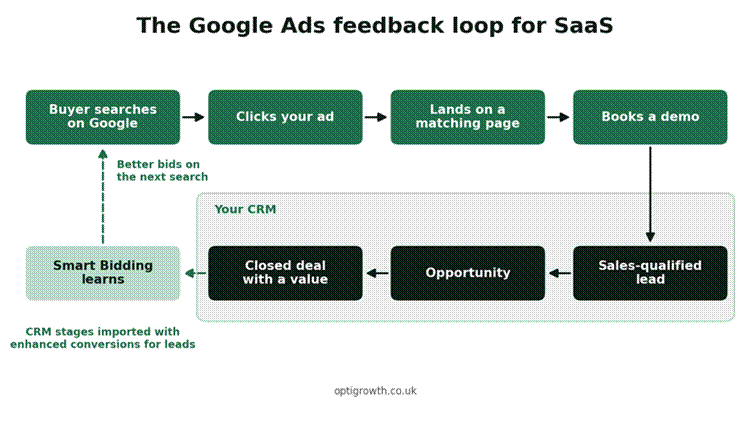
Figure 2: Send CRM outcomes back to Google Ads so bidding learns what a good lead looks like
| Metric | What it tells you | Where to find it |
| Impression share on category terms | How much of the high-intent demand you reach | Google Ads |
| Click-through rate | Whether your ads match the search | Google Ads |
| Demo or trial conversion rate | Whether your landing page persuades | Google Ads and GA4 |
| Cost per demo | What a meeting costs you | Google Ads, checked against your calendar |
| Cost per SQL | What a lead sales accepts costs you | Your CRM, with imported stages |
| Pipeline and revenue per pound spent | Whether paid search makes money | Your CRM and finance data |
Our CRM and call tracking service connects these numbers, so every pound of spend ties back to pipeline.
How much does Google Ads for SaaS cost in the UK?
You pay two costs: ad spend to Google and a management fee if you use an agency. Ad spend depends on the auction for your keywords, so check Keyword Planner estimates for your own terms.
ExpertSure’s UK pricing guide, updated in October 2026, compared nine agencies’ published PPC prices. Entry-tier management fees ran from £145 to £1,200 a month, plus ad spend. Its example: £445 of management with £5,000 of Google Ads is a £5,445 monthly bill before VAT.
Higher tiers cost more for bigger budgets. One agency in the same guide lists £2,500 a month for budgets of £50,000 or more.
How to set a starting Google Ads budget
- Set a target: decide how many demos a month you need for the test.
- Estimate your conversion rate: use your current site data, or a cautious estimate if you have none.
- Estimate cost per click: use Keyword Planner for your category and competitor keywords.
- Work out the clicks needed: divide target demos by your conversion rate.
- Multiply clicks by cost per click: that gives your monthly ad budget for the test.
Run the test for at least two to three months before judging it. B2B leads take time to move through the CRM, so early cost per lead can mislead.
Our Google Ads agency team manages Google Ads for SaaS and B2B tech firms across the UK. See also our paid search marketing service.
Case study: Google Ads results from two B2B software accounts
Innovent: software development and digital transformation
Innovent sells custom software, cloud and digital transformation services in the UAE, Europe and North America. Its growth relied almost entirely on referrals before the engagement. Over six months, we ran high-intent Search campaigns with conversion tracking, negative keyword management and A/B tests.
| Google Ads metric (six months) | Result |
| Qualified leads generated | 310+ |
| Cost per lead against baseline | 42% lower |
| Average conversion rate | 5.8% |
| Return on ad spend | 3.9 times |
Integ Consulting: compliance and AI software for utilities
Integ’s campaign targeted power generation and utility terms, with exact and phrase match and regular search term reviews. The biggest win was fixing what counted as a conversion.
| Google Ads metric | Result |
| Click-through rate, PowerGADS ad group | 4.26% |
| Click-through rate, AI in Utilities ad group | 3.99% |
| Form events counted as conversions | 46 |
| Verified demos in the first 30 days | 2 |
Both companies sell mainly outside the UK. Treat these figures as proof of the method, not as UK benchmarks. See more results on our work page.
Your first 90 days of Google Ads for SaaS
Days 1 to 30: track and launch
- Set up consent mode, demo and trial tracking, and primary and secondary conversions.
- Build brand, category and competitor campaigns on exact and phrase match.
- Add a shared negative keyword list before the first click.
- Launch one landing page per campaign, with a short form and a calendar step.
Days 31 to 60: clean and connect
- Review search terms every week and add new negatives.
- Pause keywords that spend without demos, and move budget to the ones that book.
- Connect your CRM and start importing SQL stages through enhanced conversions for leads.
Days 61 to 90: optimise and expand
- Move to Maximise conversions or Target CPA once demo data is steady.
- Test a problem and use-case campaign with strict negatives.
- Compare cost per SQL by campaign and shift budget to the winners.
Common mistakes in Google Ads for SaaS
- Optimising for form fills or button clicks instead of demos and SQLs.
- Sending every ad to the homepage instead of a matching landing page.
- Running broad match and Performance Max before tracking reports real leads.
- Forgetting negative keywords for jobs, training and free tools.
- Using a competitor’s name in ad text, or making comparison claims you cannot prove.
- Skipping consent mode, then misreading results when UK visitors decline cookies.
- Judging the account after two weeks, before leads have moved through the CRM.
Frequently asked questions about Google Ads for SaaS
Is Google Ads worth it for SaaS companies?
Google Ads for SaaS is worth it when buyers search for your category and leads flow into a CRM. It reaches people at the moment of need and can start bringing demos within weeks. It works best alongside SEO, which keeps working after ad spend stops.
How much should a SaaS company spend on Google Ads in the UK?
Work back from your goal: target demos divided by conversion rate, multiplied by cost per click from Keyword Planner. Agency fees are extra. ExpertSure’s October 2026 guide found published UK PPC management fees from £145 to £1,200 a month at entry level.
Should SaaS companies use broad match keywords?
Google says broad match should be used with Smart Bidding. In B2B, broad match can drift towards students and job seekers if conversion data is weak. Start with exact and phrase match, then test broad match once tracking records qualified leads.
Should B2B SaaS companies use Performance Max?
Use it only after tracking reports qualified leads, because it optimises to the conversions you give it. It shows ads across YouTube, Display, Search, Discover, Gmail and Maps from one campaign. Add campaign-level negative keywords and compare its lead quality with your Search campaigns.
Can I bid on competitor brand names in the UK?
Google’s trademark policy says it will not restrict trademarks used as keywords. It does restrict a direct competitor using a trademark in ad text. Keep rival names out of your ads, and make landing page comparisons fair and verifiable under ASA rules.
How do I track demos and SQLs from Google Ads?
Make confirmed demo bookings a primary conversion and keep weaker actions secondary. Then use enhanced conversions for leads to import CRM stages, such as SQL and closed won. This matches hashed lead data to ad clicks so bidding learns what a good lead looks like.
Do I need consent mode for Google Ads in the UK?
If you use cookies for advertising, the ICO says you must get consent, as no exception covers online advertising. Google’s EU user consent policy also applies to UK users. Consent mode passes each visitor’s choice to Google, so your tags respect it.
Get a free Google Ads audit
OptiGrowth is an AI digital marketing agency based in Manchester. We run Google Ads for SaaS and B2B tech companies in the UK, built around demos and pipeline.
Our free marketing audit includes a 30-minute strategy call and a 90-day growth roadmap, with no obligation. For the wider picture, read our SaaS marketing guide or see our SaaS marketing agency page.
Pair paid search with outbound using our LinkedIn lead generation guide. If you would rather talk first, contact our team directly.